
ServiceChannel
Modified on
July 27, 2026
Put time back in your day with powerful ServiceChannel AI embedded in your daily workflows. Turn a single mobile photo into a complete asset record. See a snapshot of all the work orders for a location. Plus, track refrigerant leaks, assets, technicians, and spaces more efficiently.
Highlights
- NEW! Asset recognition. Snap a photo of an asset on mobile and AI fills in make, model, and serial number.
- NEW! Location summaries. Get an instant summary of every open work order and upcoming preventive maintenance at a location.
- Other updates. Refrigerant leak inspections, merge duplicate assets, technician dispatch, location spaces, checklist follow-up, and more.
- Coming this Fall. Prioritize urgent work and let AI agents recommend actions or take next steps. Plus, take action on multiple proposals at once.
Identify and create assets faster with AI asset recognition
You can now identify, create, and manage assets by simply taking a photo in ServiceChannel Mobile or the ServiceChannel Provider app. The apps use AI image recognition to extract key details like make, model, and serial number, suggest an asset type, and auto-fill asset fields, while asking you to confirm the values before anything is saved.
Capture assets faster and more accurately
- Enter asset data automatically. Snap a photo of the nameplate and AI identifies the make, model, and serial to reduce typing and errors.
- Better inventory and compliance data. Capture consistent asset details at the source, improving record quality for audits and reporting.
- Faster work execution. Attach the right asset to the work order easily so providers arrive prepared and finish the job sooner.
Stay in control while AI does the heavy lifting
- Built into the mobile workflows you already use. Available across work order creation, asset search, and asset validation in ServiceChannel Mobile and the ServiceChannel Provider app.
- Review before saving. AI suggests, and the user confirms—nothing is created or updated without explicit confirmation.
- Secure and auditable. User permissions control access to asset creation, while actions are tracked for analytics and reporting.
Get started
Included for all subscribers as part of ServiceChannel AI. Available for beta testing after July 1, 2026. Contact your customer support team for access.
Take a tour
Get a summary of all the work orders from a location
Pulling together everything happening at a location used to mean checking multiple work order lists, looking through upcoming preventative maintenance, and piecing together recent activity manually. Now you can get a snapshot of all this activity across a location with one click, so you can quickly understand what’s happening — and what to do next.
- Get a real-time snapshot of location activity. See a breakdown of open or in-progress emergency work orders, repair and planned maintenance work orders scheduled in the next 7 days, and excessive calls from the last 30 days.
- Automatically identify recurring issues. Excessive calls are flagged when the same trade, equipment, and problem code combination appears more than three times within a 30-day period, helping you spot repeat problems before they become larger operational issues.
- Drill down with one click. Each item shows work order count and links to a filtered work order list, so you can quickly investigate details and take action.
Get started
Available in beta for all subscribers by request. Contact your customer support team to request access.
Once you have access, you can see location summaries in these ways:
- On web or mobile: open ServiceChannel AI chat > click Summarize Work Orders by Location
- On location dashboard on web: click the Location WOs highlights tab
- On ServiceChannel Mobile: tap Locations > Location WOs highlights
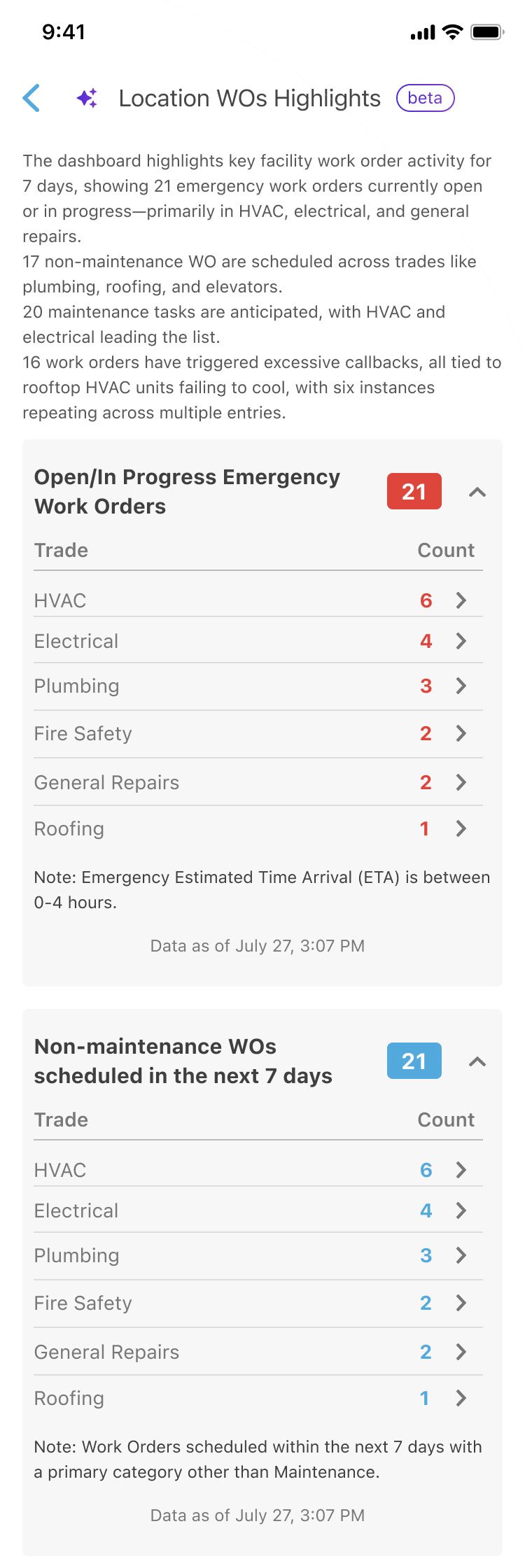
Get a snapshot of a location’s activity in ServiceChannel Mobile
Additional updates
- Require refrigerant leak inspections
- Expand visibility of the Refrigerant Tracking Dashboard
- Eliminate duplicate assets
- Dispatch field techs faster
- Organize location spaces and space groups
- Automate failed checklist follow-ups
- Review/approve invoices faster on mobile
- Block invoices for compliance
- Give internal technicians tools to organize their day
- Try ongoing AI beta features: Work order creation, summaries, and anomaly detection
Validate compliance with required refrigerant leak inspections
To help you stay ahead of evolving EPA regulations and avoid costly compliance risks, you can now require a leak inspection record for every detected refrigerant leak. Once activated, users must complete a leak inspection record for every leak event before closing the work order across web, mobile, and provider workflows.
- Compliance for every leak. Required leak inspections are recorded on every detected refrigerant leak before the work order can close.
- Inspection methods captured. Select from nine standard verification methods (bubble test, electronic leak detection, ultrasonic detection, pressure test, vacuum test, fluorescent test, infrared test, near-infrared test, halon gas detection) and acknowledge compliance.
- Audit-ready records and exports. Inspection details are logged in asset and refrigerant history and are exportable for compliance reporting.
- Configurable compliance text. Compliance acknowledgment wording can be customized in the Refrigerant Tracking admin settings.
Get started
Included with Refrigerant Tracking. Request activation by your customer support team.
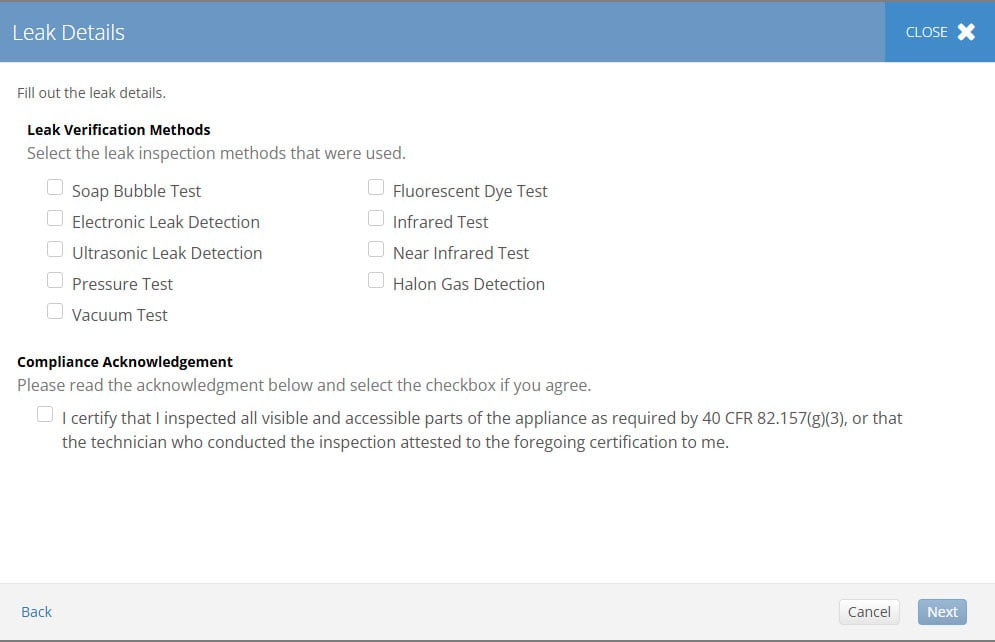
Providers must choose between nine leak verification methods and acknowledge compliance
Expanded compliance visibility with the Refrigerant Tracking Dashboard
The Refrigerant Tracking Dashboard can now be found in the main Dashboards section, where it features a new State filter and supports scheduled email delivery in PDF or Excel format, so compliance and sustainability teams can stay ahead of changing requirements with more streamlined reporting capabilities.
- Schedule delivery. Schedule the entire dashboard to be sent as a PDF or subscribe to individual reports as Excel files.
- Expand compliance coverage. Track retrofit and retirement requirements, automatic leak detection compliance and calibration schedules, leak inspection status, un-repaired leaks, refrigerant adds without leaks, California’s GWP weighted average, and Washington’s rolling 365-day leak rate.
- Get better visibility for regulated programs. Proactive notifications help reduce regulatory risk and support reporting across EPA Section 608, AIM Act, California, Washington, New York, and SCAQMD requirements.
- Integrate with your other systems. Data is available in Analytics, Data Direct, and the API.
Get started
Included with Refrigerant Tracking. Request activation by your customer support team, then configure dashboard filters and notifications for your compliance team in Refrigerant Tracking admin settings.
Clean up duplicate asset records in a few clicks
Eliminate duplicate asset records and refine your asset data quality by merging asset records of the same type and location through a guided workflow.
- Guided merge workflow. Permission-controlled flow consolidates work orders, invoices, parts usage, and custom attributes into a single asset record.
- Aaudit trail. All actions are logged, so your regulatory compliance and audit trail is preserved.
- Permission-based and secure. Only authorized users with the new Asset Merger role can merge asset records.
Get started
Request activation by your customer support team, then assign the Asset Merger role to authorized users in Admin > Users > Permissions. Included for all subscribers.
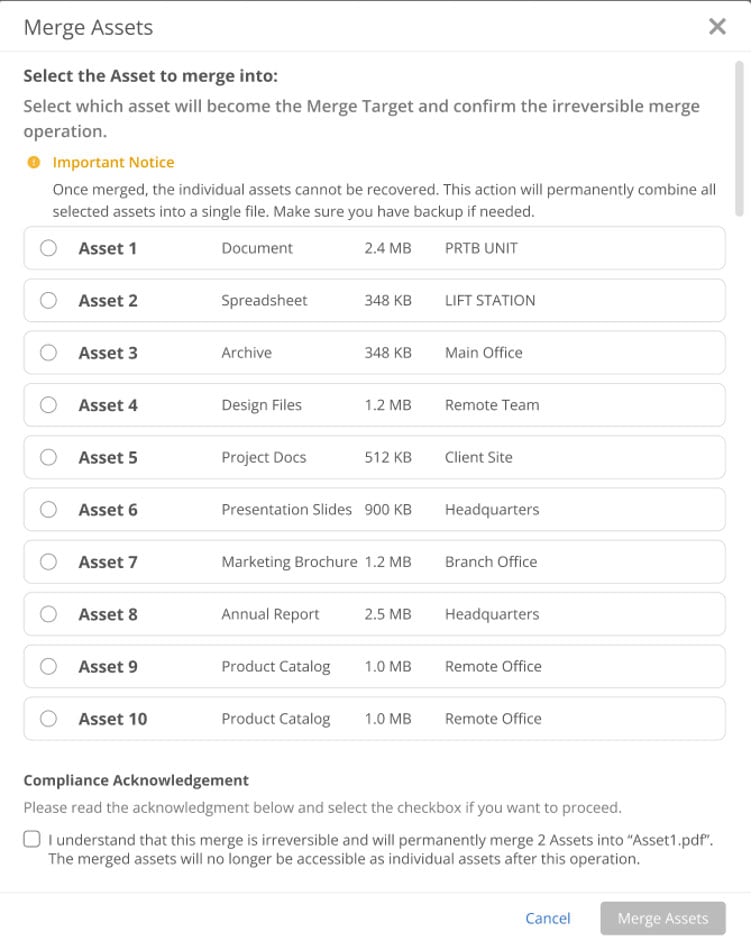
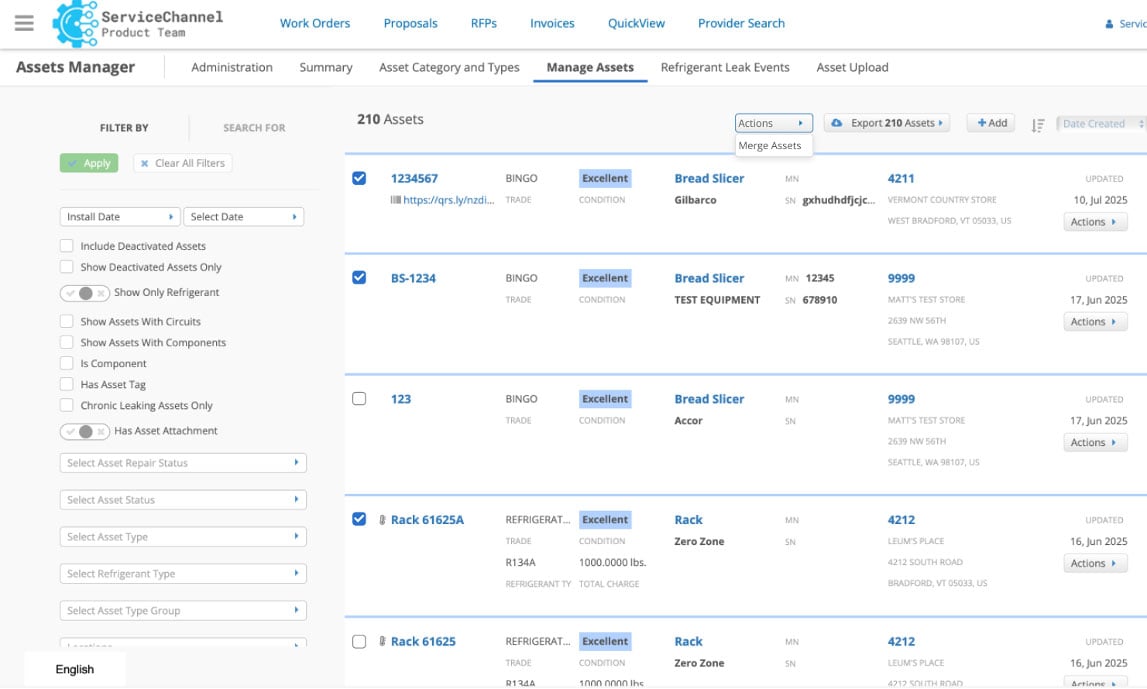
Merge assets with a full audit trail and permission controls
Faster dispatch scheduling for field technicians
Dispatchers spend their days moving work orders around. This release adds two improvements to that workflow: drag-and-drop scheduling on the Dispatch Board and bulk reassignment of work orders via Excel upload.
- Drag and drop on the Dispatch Board. Move work order tiles to a new position or technician row to update schedules and assignments instantly.
- Reassign work orders in bulk. Reassign many work orders to different technicians by uploading the Excel template.
- Use the right tool for the job. Drag-and-drop supports individual adjustments, while bulk upload supports portfolio-wide rebalances and turnover-driven shifts.
- Maintain auditability. Audit logs capture each reassignment to support operational visibility.
Get started
Included with the Field Technicians module.
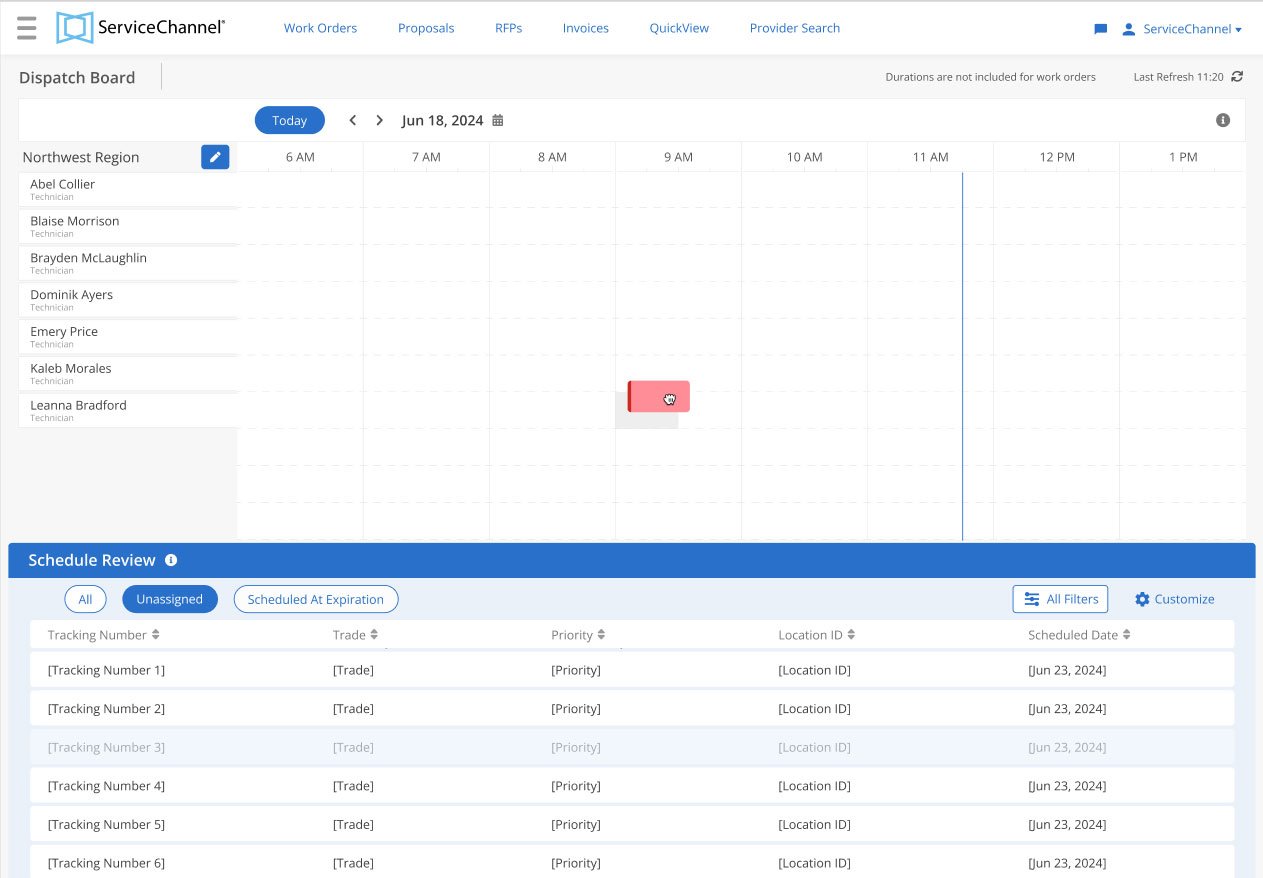
Drag a work order to another technician’s row to reassign instantly
Track work orders within large, complex locations
It can be difficult to track work orders in multi-floor buildings or complex sites when every space is treated as a single flat area. With the new location hierarchy feature, you can now configure a flexible, multi-level structure that precisely matches your real-world operations.
- Configurable spaces. Locations can be divided into space groups (like building B or floor 3) made up of named spaces (like room 103 or suite C) from your customized space types (like suite or restroom).
- Multi-level hierarchy. Configure up to 32 levels of nested space groups to handle any situation in your operations.
- Map problem codes to space types.You can map each problem code in an issue list to the relevant space types for more precise work order creation.
- Granular reporting. Track and report on work orders for any space or space group, such as by floor, building, or suite.
Get started
Included for all subscribers. Contact your customer support team to set up location hierarchies.
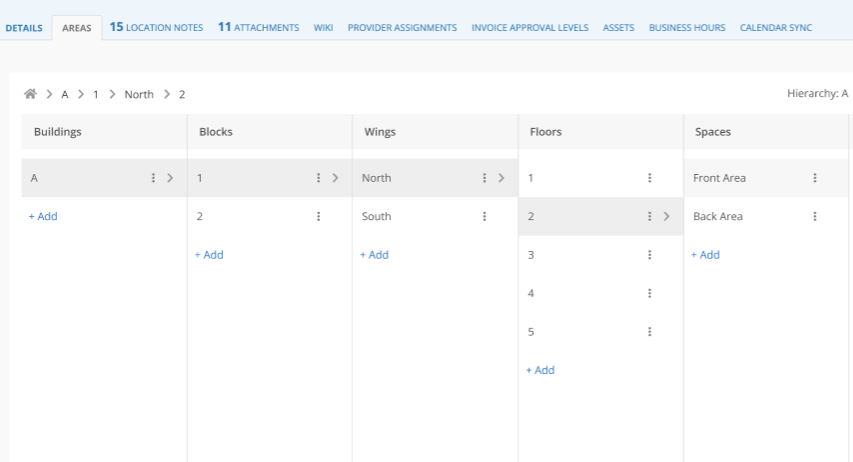
Define space groups and spaces with custom types up to 32 levels deep.
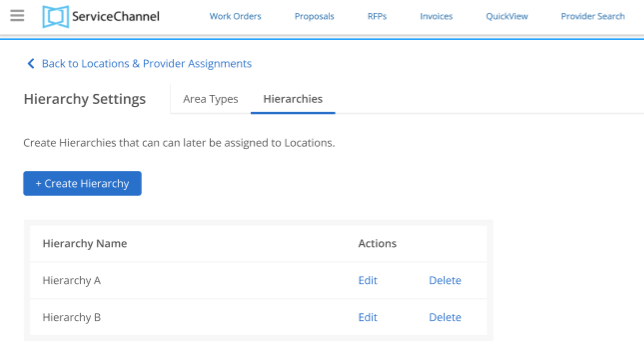
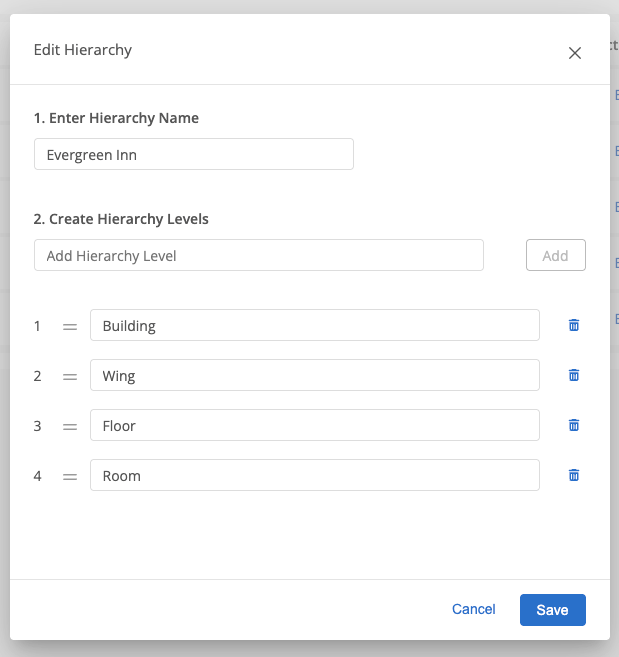
Create space hierarchies easily
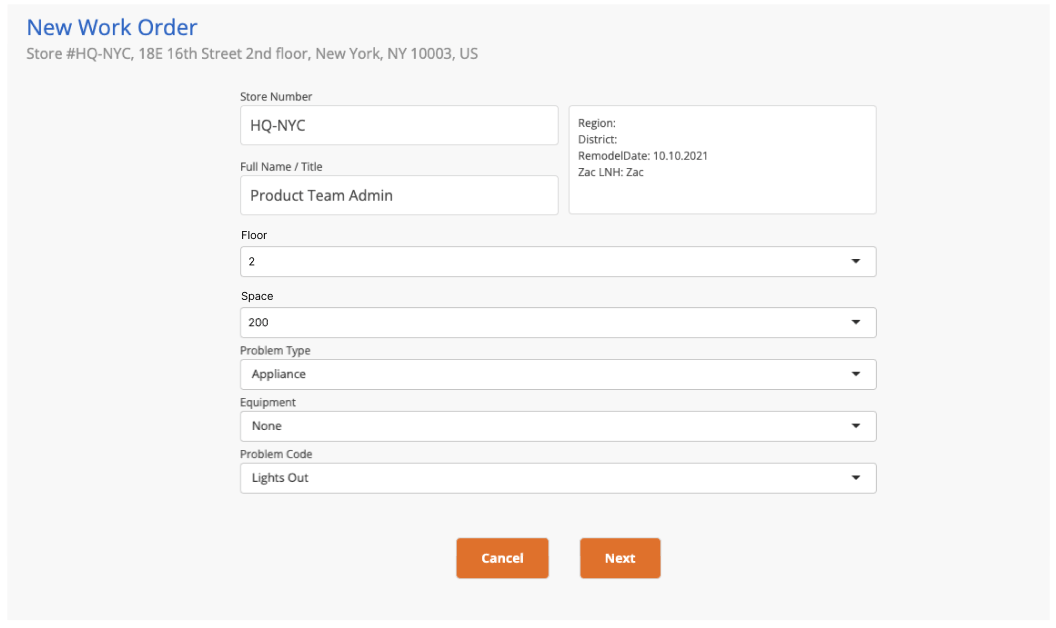
Assign work orders to specific spaces
Automate follow-up fixes for failed checklist items
When a technician fails an item on a checklist — like a refrigeration coil reading out of range, a loose handrail, or a missing fire-safety tag — the next step is almost always a follow-up work order. Now you can close the loop automatically by triggering follow-up work orders for any failed items while linking to the source checklist, so teams have an audit-ready trail, from failure to fix.
- Follow up separately or together. You determine if failures create individual or combined follow-up work orders.
- Review in queue. Pending follow-ups appear in a queue you can review, approve, or cancel before they go to a provider.
- Easily view the source checklist. Each follow-up work order includes a Reason field linking back to the failed checklist item.
Get started
Included for all subscribers. Request activation by your customer support team and then configure on the Checklist Admin page.
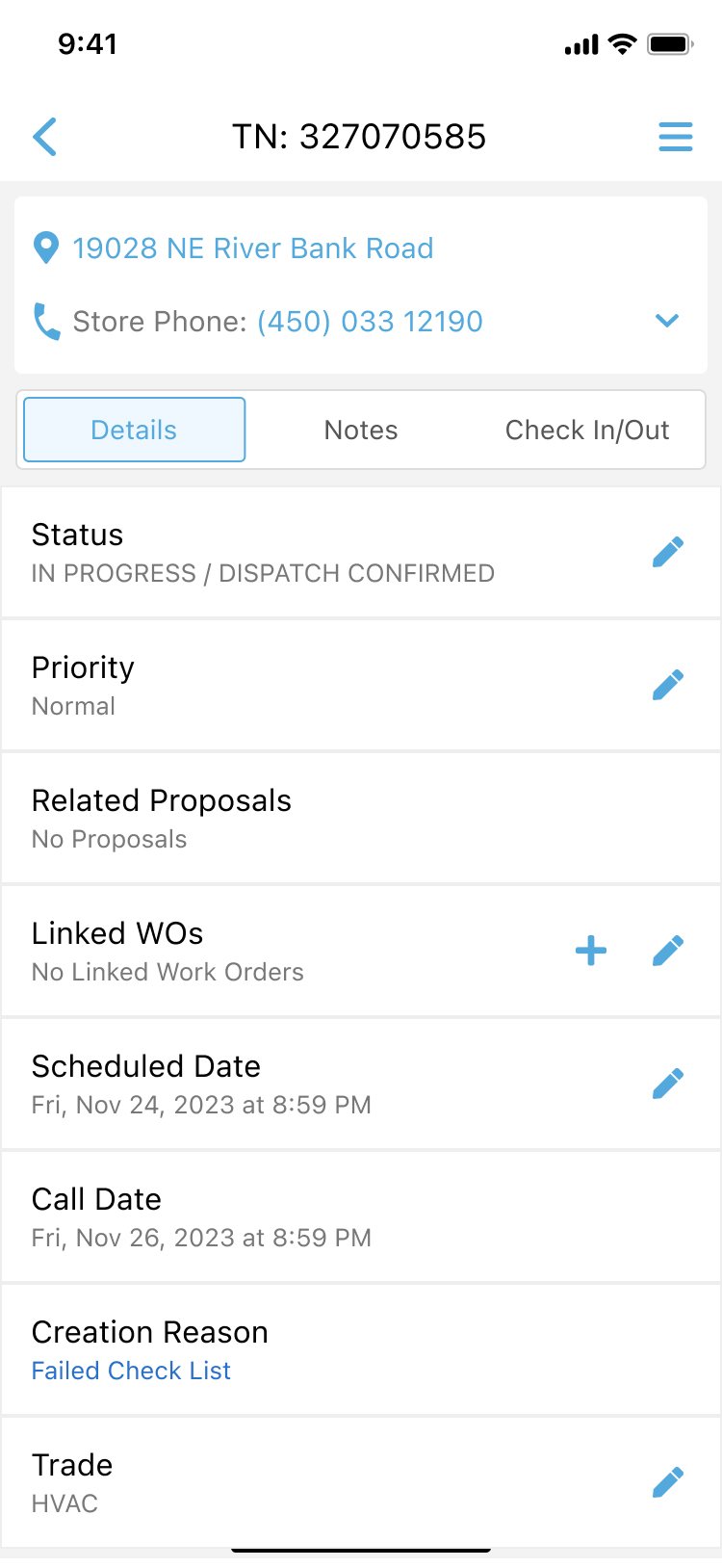
A failed inspection item triggers a follow-up work order in the review queue.
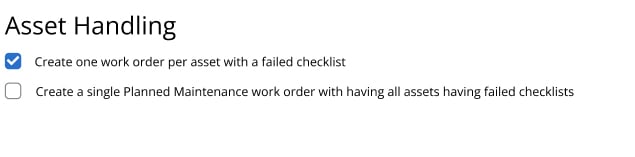
Choose whether failed items create individual or combined work orders.
Review and approve invoices faster in ServiceChannel Mobile
Manage invoices across multiple locations faster and easier in ServiceChannel Mobile. Quickly narrow down long lists with improved filtering and find the invoices you need without digging through multiple screens. Combined with expanded sorting options, your team can organize and review invoices in fewer taps while on the go.
- Sort by what matters. Sort the invoice list across multiple locations by Invoice #, Date, PO #, Trade, Location ID, Provider Name, Status, or Amount in ascending or descending order.
- Filter across multiple locations. Quickly narrow invoices by Location ID, Region, District, or Location Name using AND/OR logic for more flexible searches.
- Download on iOS or Android: Be sure to update to the latest version of the ServiceChannel Mobile app.
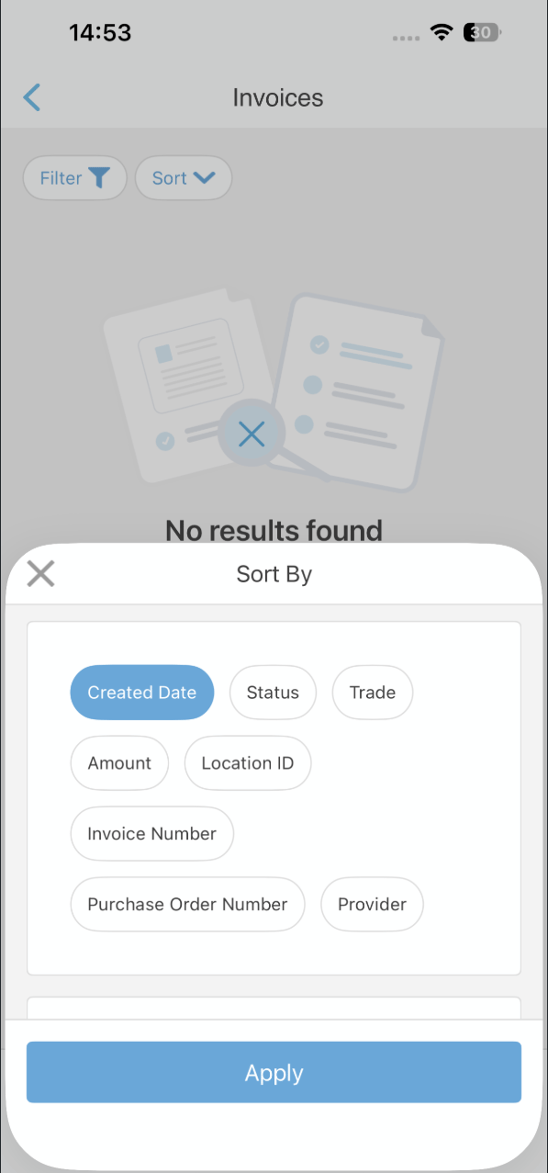
Find invoices in fewer taps
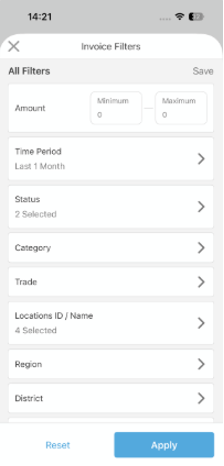
Filter invoices faster across locations
Get started
Update the ServiceChannel Mobile app to the latest version. Included for all subscribers.
Block invoices when compliance details are missing
Boost completion of compliance work by preventing providers from invoicing until the required details are entered.
- Require compliance details: Work orders are held in an unbillable status until the required details are entered: compliance status, compliance attachment, and corresponding dates.
- See pending compliance status: After a work order is confirmed complete, its status updates to ‘Completed/Pending Compliance Details’ if compliance details are missing.
- Unblock invoices automatically: Once compliance details are entered, the work order status updates to ‘Completed/Confirmed’ and invoicing can proceed normally.
- Reduce compliance risk and delays: Prevent downstream fines, closures, or missed requirements while incentivizing timely provider data entry.
Get started
Included for all subscribers. Request activation by your customer support team.
Give internal technicians tools to organize their day
Find everything you need to start and manage your day in one place on your new home screen in the ServiceChannel Provider app.
- Search for work orders and track time right from the home screen.
- Get more context on each module.
- Bring new-hires up to speed faster.
Get started
Update to the latest version of the ServiceChannel Provider app to see the redesigned home, search, and profile experience.
Try ongoing AI beta features
These ServiceChannel AI capabilities first shipped in the Spring 2026 Product Release and remain available in beta for all subscribers. To get started, request access through your customer support team.
Create accurate work orders via chat
Create clear, complete work orders by chatting on web or mobile. The experience is easier for everyone, while still following your existing routing logic. Photos and videos are analyzed for additional context, suggested work order details can be reviewed and edited before submitting, and your standard issue list routing takes over from there.
- Submit better work orders without any training, even with high turnover.
- Reduce delays and costs from missing or incorrect work order information.
- Clarify scope and symptoms before dispatch for less follow-up.
- Share feedback with the thumbs up and thumbs down buttons.
Get instant work order context with summaries
Get a quick, clear snapshot of the current situation — what happened, what’s next, and what’s blocking progress — without digging through long note histories. Summaries load automatically when you open a work order on web or mobile, or you can generate them on demand from the work order list or location dashboard.
- Understand status across many open work orders without manual review.
- Reduce escalations and delays by aligning on the current state and blockers.
- Providers see the same story you do on the web and in the field.
Avoid work order delays with ServiceChannel AI anomalies
When important work orders are delayed, your customers and employees are left waiting. See potential anomalies as soon as a work order is created, get suggested updates, and alert your provider in the service request email so they arrive prepared.
- Catch wrong trades, unrealistic not-to-exceed limits, and multi-visit risks before dispatch.
- View insights right in the work order with a ServiceChannel AI tab that highlights likely anomalies and resolutions.
- Give providers an early heads-up in the service request email, so they arrive with the right parts and plan.
- Configure overrides in Admin > ServiceChannel AI > WO Anomaly Overrides.
Coming this Fall
Prioritize urgent work and let AI agents take next steps in Action Hub
Facilities teams spend hours every week chasing work orders, asking providers for status updates, and escalating overdue items. ServiceChannel AI Action Hub turns that chase into a prioritized task list. Then, an AI agent surfaces the work that needs attention today, recommends next steps, and — where you allow it — takes action on your behalf.
Prioritize your most important actions with rule builder
- Determine what you prioritize: Set up rules to prioritize the work order tasks that need urgent attention across your portfolio.
- See what matters today: The Action Hub list ranks all work orders that fit your criteria by your desired weighting, with the most urgent items on top.
Identify and unblock stalled work orders
- Get recommended next steps: An AI agent flags stalled or at-risk work orders and recommend next steps based on ServiceChannel’s dataset of 300 million work orders.
- Automate where it makes sense: Configure the rule builder so AI can take routine actions on your behalf, with the level of oversight you set.
- Manage tasks across teams: Assign, categorize, and prioritize tasks across teams, with new task types and team-based assignments.
Get started
Selected customers are testing in beta now. All customers will get beta access in the Fall ’26 release in October.
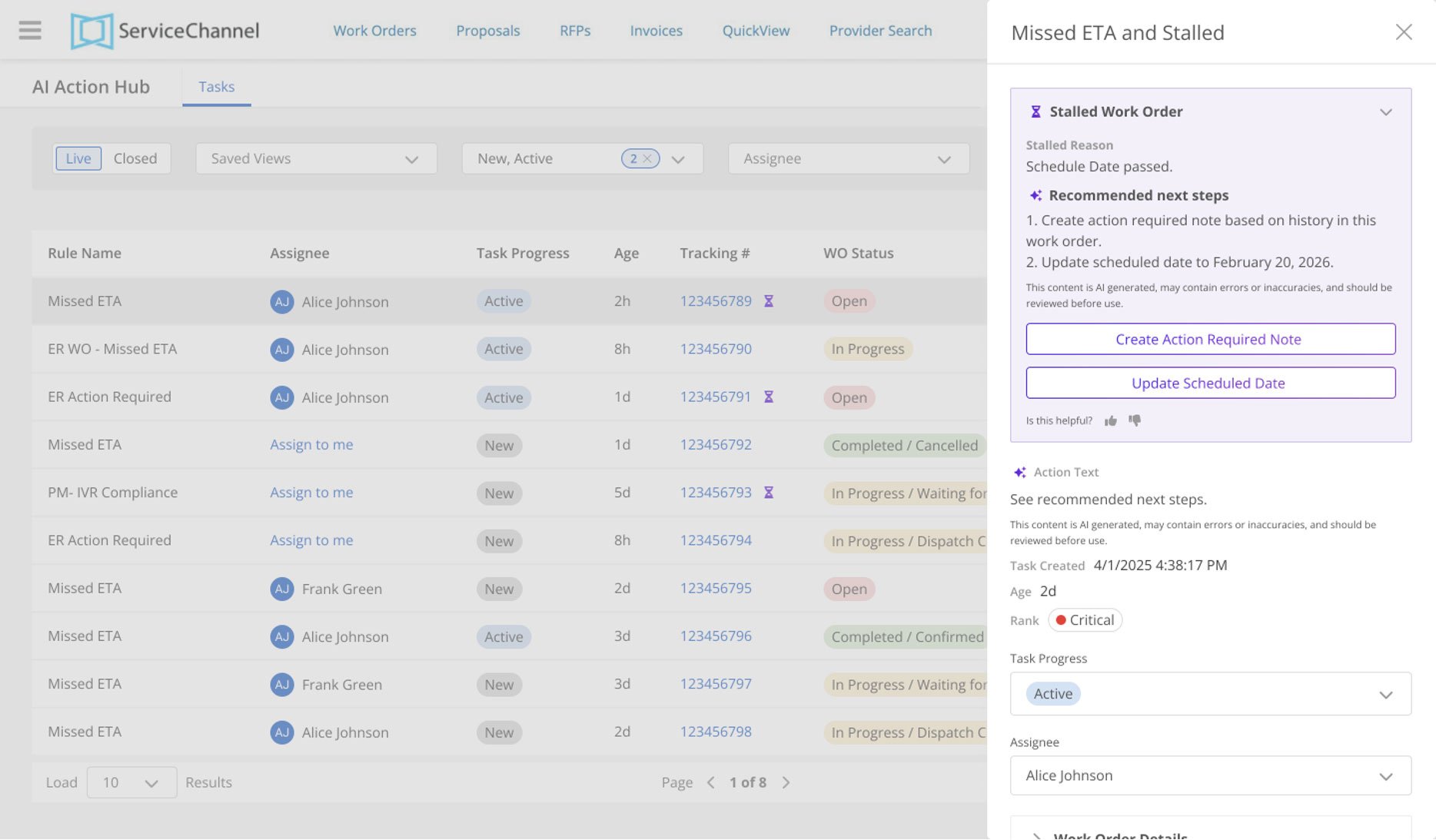
Action Hub gives facilities teams a single, AI-prioritized task list to start their day
Take action on multiple proposals at once
Save time by acting on multiple proposals at once with bulk actions on the proposal list. Select multiple proposals from the list and perform common actions, like Approve, Reject, Place on Hold, Assign, Reassign, or Edit, in a single step to reduce repetitive work and improve consistency.
- Select multiple, act once: A bulk action bar appears when multiple proposals are selected, and only relevant actions are shown.
- Handles field dependencies. When you change fields like Category and Priority, then you’ll see only the relevant options for dependent fields like Approval Code and Additional Approval Code.
Get started
Included for all customers. For early access before October, request activation by your customer support team.
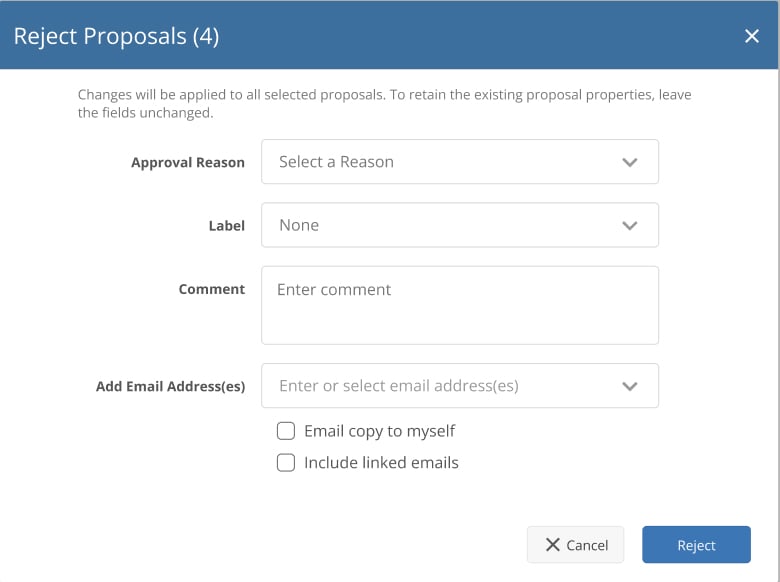
Reject, approve, and take action on multiple proposals at once
See all the updates
These are just the highlights, so be sure to check out all the latest innovations in the Summer 2026 Product Release.
Frequently Asked Questions (FAQ)
You can view a location summary from the location dashboard, the work order list, or any work order’s details page on web. Mobile support is planned for a future release.
No. Action Hub will be available to beta participants in September. AI capabilities for Stalled Work Agent will be available for testing with Action Hub later. Be among the first to take advantage of these time saving features by signing up with your customer support team.
Clients who wish to gain early access to the benefits of Action Hub should contact their customer support team. If eligible, they will be granted access to the beta once we are ready for their participation. Clients who participate in the beta must agree to enable the Action Hub feature and set up the rules to flag work orders that need their attention. Additionally, clients are required to participate in regular conversations with ServiceChannel teams to evaluate the usage and performance of Action Hub.
You control the level of autonomy for AI. Action Hub follows a phased trust model: assist, recommend, automate. You will always be able to see the actions that AI takes on your behalf, and you can change your AI settings at any time.
ServiceChannel AI supports facilities managers; it doesn’t replace them. It handles repetitive tasks so they can focus on decisions and running operations. Facilities teams often have this concern at first, but once they see it in action, they’re excited because it removes the most tedious parts of their job. Facilities managers are in control. They make final decisions, control workflows, and use AI insights to move faster, stay informed, and run operations more effectively.
ServiceChannel AI isn’t a separate tool your team needs to adopt. It’s built directly into the platform you already use, with the same security, permissions, and governance in place. We also have a formal AI policy framework that has been reviewed by Legal and Security. Your IT team can evaluate it like any other feature, and we’re happy to walk through the details with them.
AI suggests; the user confirms. Nothing is created without explicit confirmation.
AI asset recognition is built directly into ServiceChannel Mobile and the Provider App, enabling users to capture asset data during normal workflows.
Here’s how it works:
- The user takes a photo of the asset.
- AI analyzes the image and extracts key details from the nameplate (e.g., make, model, serial number).
- The system suggests an asset type and checks for potential matches.
- The user reviews and confirms before saving or updating the record.
This process ensures:
Continued user control over all data creation and updates
Faster asset identification on-site
More accurate asset records from the start
AI asset recognition improves asset data accuracy by capturing standardized information at the source—directly from the asset itself.
Instead of relying on:
- Manual typing
- Incomplete records
- Inconsistent naming conventions
You can:
- Automatically extract structured asset details from images
- Ensure consistent data across locations and teams
- Improve data quality for reporting, audits, and compliance
Higher-quality asset data leads to better decision-making across maintenance, budgeting, and lifecycle planning.
Yes, AI asset recognition is fully integrated into existing ServiceChannel workflows, including:
- Work order creation and updates
- Asset search and validation
- Inventory and asset management processes
This means teams can:
- Assign the correct asset to a work order faster
- Ensure inventory and asset records stay aligned
- Maintain consistent data across operations
By embedding AI into everyday workflows, teams reduce friction and keep operations moving efficiently from request to resolution.
Yes, AI asset recognition is designed with enterprise security and user control in mind.
Key controls include:
- User confirmation required: AI suggestions are never automatically saved
- Permission-based access: Only authorized users can create or modify asset records
- Audit tracking: All actions are logged for reporting and compliance
- Device security alignment: Follows native mobile security protocols
This ensures organizations can benefit from AI automation while maintaining full visibility and control over asset data.
Your uploaded images are not used to train the model.
The requirement only applies to leaks detected after the feature is enabled.
Nine standard methods: bubble test, electronic leak detection, ultrasonic detection, pressure test, vacuum test, fluorescent test, infrared test, near-infrared test, and halon gas detection.
You can schedule sending the entire dashboard as a PDF or individual reports as Excel files to any email address.
The merge consolidates records permanently. The audit log captures every merge so you can reconstruct prior state if needed.
Yes, existing Area data is preserved.
Only if you configure it that way. Most customers start with review-required.
Yes, rules support per-failure individual work orders or grouped follow-ups for related failures.
Web invoice management already supports robust filtering and sorting. This release brings ServiceChannel Mobile to parity.
Only when compliance information is missing. Once providers enter the required details, invoicing proceeds normally.