
ServiceChannel
Modified on
September 24, 2026
The latest ServiceChannel updates bring you more AI-powered tools, new ways to help customers find your business, and improvements that make it easier to complete work and manage your business.
Highlights
Updates to streamline and grow your business
- New API integration model makes it affordable for providers of all sizes to avoid double-entry and cut admin cost. Available now.
- Offline mobile check in/out lets you check in/out without cell service, which can help you meet customer requirements and avoid missed check-ins that can affect your performance. Coming late October.
- New Provider Search filters boost your exposure to more new customers if your profile is up to date. Coming late October.
- ServiceChannel Trust Center puts security, compliance, policies, and technology partners in one convenient place. Available now.
Updates to move work forward, get paid faster
- AI work order summaries are already saving providers hours of scrolling through pages of notes to see status. Available now.
- AI suggested root-cause and resolution codes boost accuracy, streamline check-out. In beta now for your customers, coming soon for providers.
- Saved checklist answers allow you to check out without answering every question again when you check back in. Coming in late October.
- Customer bulk action on proposals can help you get faster approvals. Coming in late October.
- See shipping updates for parts on order to reduce back-and-forth with customers. Coming in late October.
- Your negotiated labor rates at your fingertips help you create spot-on proposals and invoices quickly. Coming in late October.
- Approved proposal costs automatically carry over to invoices to help you create accurate invoices faster. Coming in late October.
Updates to streamline and grow your business
API integrations now available to providers of all sizes
An API integration can cut your work order admin costs as much as 50%. A new usage-based model now makes this an option for all providers, not just the largest.
- Manage your ServiceChannel work orders directly from your own system. No more error-prone, time-consuming double data entry.
- Reduce the need to toggle back and forth between systems.
- For as low as $500 per month, you can now get a fully supported integration.
From start to go-live, the set-up time is typically just a few days to a few weeks. Right now, ahead of the busy holiday season, is the perfect time to get started!
Get started
Get your questions answered and see how to get started now >
Check in/out on mobile, even when you lose service
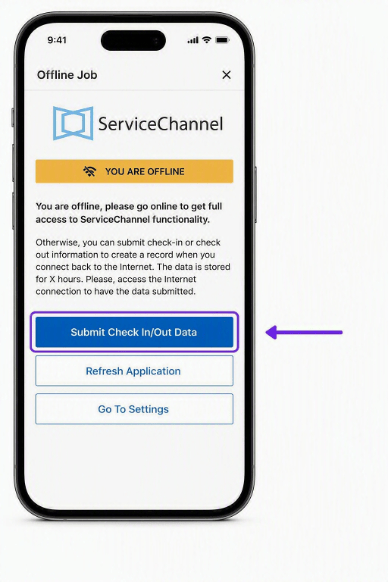
Starting October 29, you can record check-in and check-out details in ServiceChannel Provider Mobile when internet or cell service is unavailable. This step, a critical factor in your performance scores, can now be captured and uploaded automatically when connectivity is restored.
- Keep working when service is unavailable. Enter the work order tracking number, provider PIN, check-in or check-out time, and an optional note.
- Capture completion notes onsite while the details are fresh. No need to wait to get back to your vehicle or home office.
- Upload the details after reconnecting. The data is stored for 24 hours and uploads automatically when internet or cell service is restored.
- Keep the work order updated. Depending on the customer’s settings, the offline details are recorded as an official check-in/out record that counts toward your performance score, or as a note on the work order.
Get started
Train your technicians to check in/out of every work order with the mobile app, even when out of range. Before arriving on site, make sure the technician has the work order tracking number and provider PIN.
Search updates help new customers find you
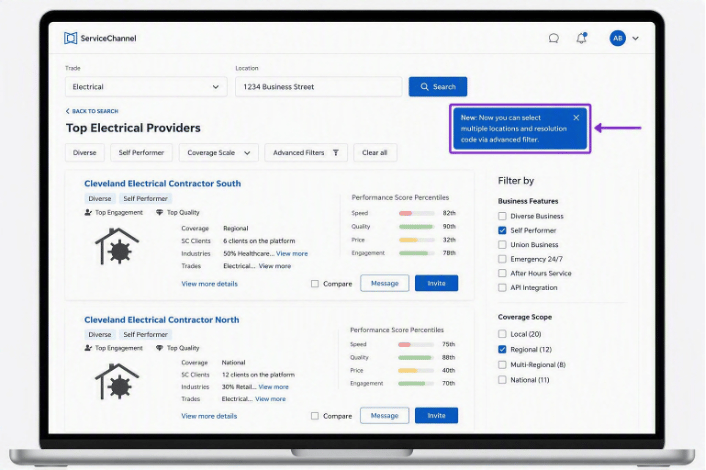
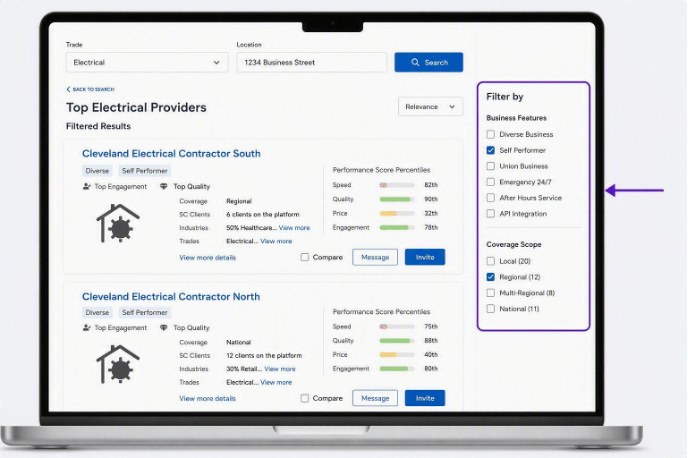
Starting October 29, updates to Provider Search will increase your opportunity to show up in more searches by potential new customers.
- Customers can do a single search for providers across multiple locations and trades. If your profile indicates you can service the searched areas, and you have strong performance scores across locations, you can receive invitations to join their network and win new business.
- Customers can refine their search by key service offerings beyond trade and location. For example, customers can filter for 24-hour response or after-hours services.
This means it’s more important than ever to revisit your provider profile regularly to keep it complete and up to date, and to follow best practices to keep your performance scores high.
Get started
Update your profile now >
- Confirm where you work. Review your location coverage, including the cities, ZIP codes, states, and service radius. Have you expanded your service area? Added new trades? Make sure your profile accurately reflects that.
- Include all key service details. Review your business information and service details including availability for emergencies, union status, where you are a self-performer or broker. Customers can now use these details to refine their search results.
Find security and compliance details in one place
In the ServiceChannel Trust Center, you can now find all the information about ServiceChannel security, compliance, policies, and technology partners in one convenient place, making it quick and easy to address questions from your IT, security, and legal teams.
- Security and compliance: Access certifications, policies, and business continuity and disaster recovery documentation.
- ServiceChannel technology partners: Review information about the third-party partners that support the ServiceChannel platform.
- Latest updates: Stay on top as new or updated security and compliance information is released.
Get started
Visit the ServiceChannel Trust Center and share it with your IT, security, and legal teams.
Updates to move work forward, get paid faster
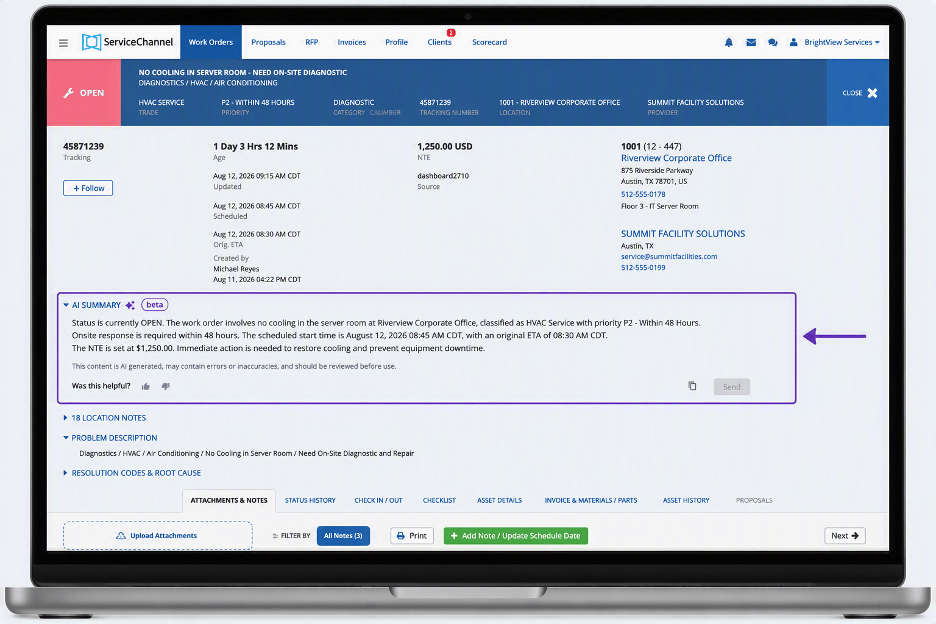
AI work order summaries save hours.
With a single click, you can now quickly see the status of any work order, what’s happened, what’s next, and what’s blocking progress.
- Avoid time-consuming scrolling through pages of work order notes or wasting time in email or phone escalations with your team or customers.
- First announced in the spring update, these time-saving AI-powered summaries are getting widespread adoption and rave reviews from providers.
“For teams like ours managing a high volume of work orders, this increased visibility and efficiency with AI summaries helps drive faster decisions and improve overall productivity. It’s great to see Service Channel continuing to invest in practical tools that make day-to-day operations easier and more effective.”
Greg Overstreet, Associate Operations Director, Alffco
Get started
Look for the AI Summary button on both the work order page and any work details page.
AI recommendations help you find the right root-cause and resolution codes fast
When you check out, AI will recommend likely resolution and root cause codes based on historical data from millions of work orders:
- See AI recommended codes at the top of the list.
- You decide. Choose a recommended code when it accurately describes the work or select another code from the full list.
- Save time during check-out. Review likely matches first instead of searching through the entire list.
Get started
AI code recommendations are in beta now for your customers. Watch for this feature coming soon for providers.
Save checklist progress without blocking check-out
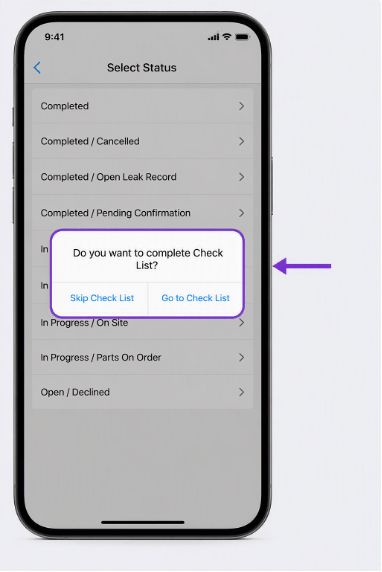
Your technicians can save partially completed checklists, then check out of a work order. Leave for parts, work across multiple assets, or complete jobs over several visits without having to answer every question again every time they check back in.
- Save progress and finish later. Save a partially completed checklist during check-out and return to complete it later.
- Move freely between job activities. Check in and out as many times as needed without losing previously entered checklist responses.
- Keep every technician aligned. All technicians assigned to the same work order can see incomplete responses, helping your teams coordinate and avoid duplicate work.
- Complete required questions when they matter. All required checklist items must still be completed before moving the work order to Completed or Completed Extended status.
Get started
Use this feature starting October 29 in the ServiceChannel Provider mobile app. No setup is required.
Get faster turnaround on your proposals
Starting October 27, your customers can take action on multiple proposals at once instead of having to review and respond to each one individually. This saves time for your customer and helps prevent costly delays for you.
- Get paid faster. Start, complete, and invoice work orders promptly.
- Deliver on your SLAs without getting stalled waiting for customer approval.
- Protect your speed score by acting promptly.
Get started
Continue submitting complete, accurate proposals so your customers have the information they need to make a quick decision.
See shipping updates for parts on order
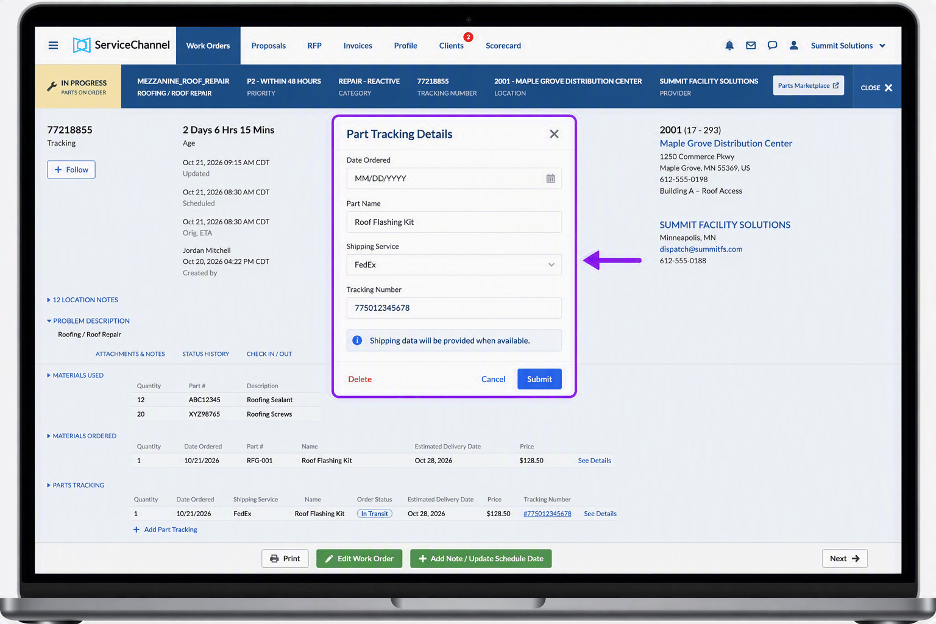
When tracking information is added for a part on order, you and your customer can follow the shipment’s progress in the work order.
- Enter the shipment’s tracking information so carrier updates can appear in ServiceChannel.
- You and your customer can follow the shipment’s progress with updated shipping information in the work order as the carrier provides it.
- No need to share separate status updates.
- Get notified if the scheduled date of the work order is before the delivery date of the part on order.
Get started
Parts tracking will gradually be made available to all providers. Meanwhile, be sure to add the tracking information to every work order with a part on order to start getting shipping updates.
Create spot-on proposals and invoices with negotiated labor rates
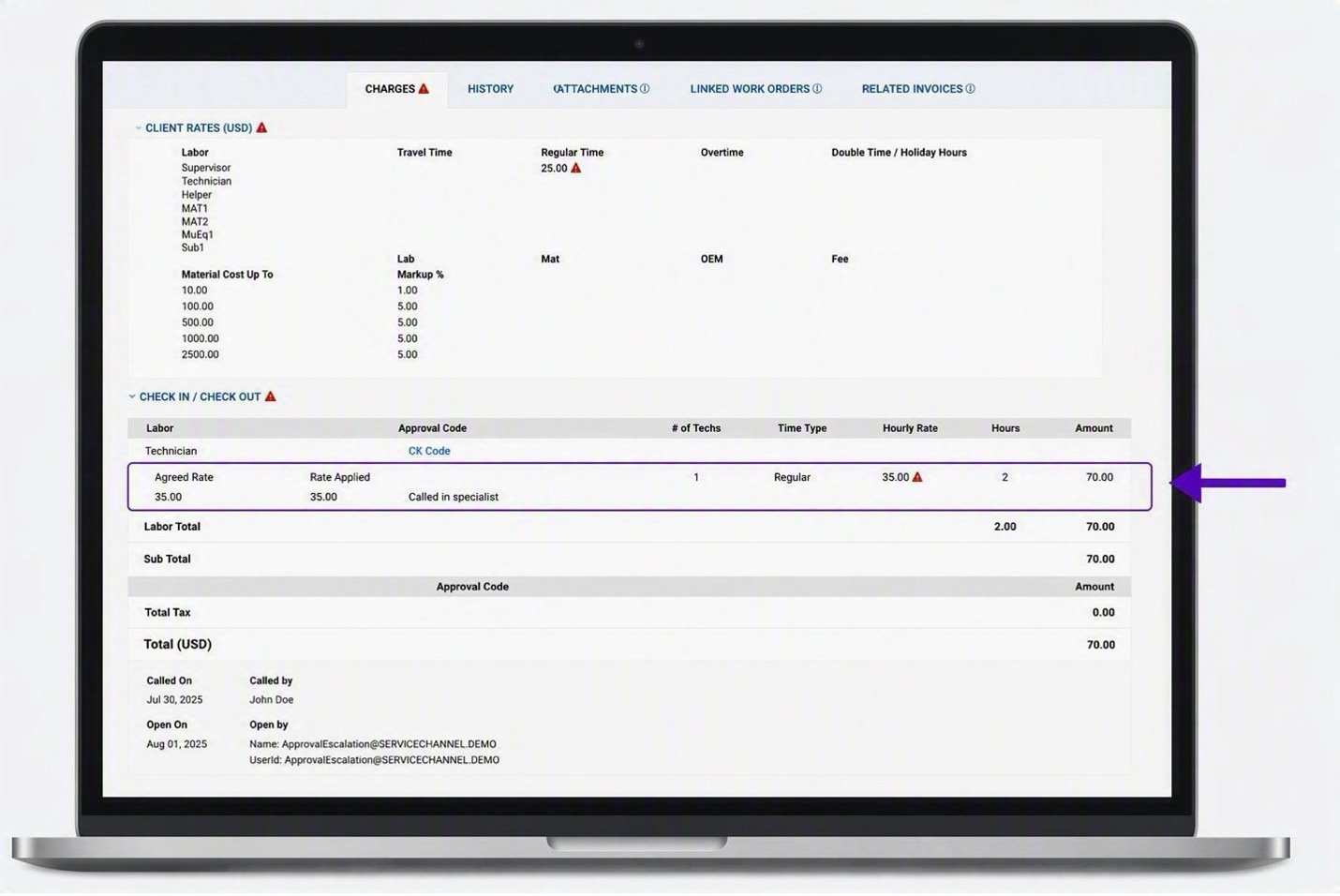
Your customers can now add labor rates you’ve negotiated to their negotiated price list (NPL) to help you create spot-on proposals and invoices quickly.
- Find the right rate easily. The labor rates you and your customer have agreed on for your company or the location are automatically populated.
- Edit the rate if needed. If you change a listed rate on an invoice, you’ll be prompted to enter a reason for the change.
Get started
Starting October 27, when you’ve negotiated labor rates, your customers can now upload those rates so they’re automatically populated into your proposals and invoices. If you see incorrect rates, reach out to your customer.
Approved proposal costs now transfer automatically to invoices
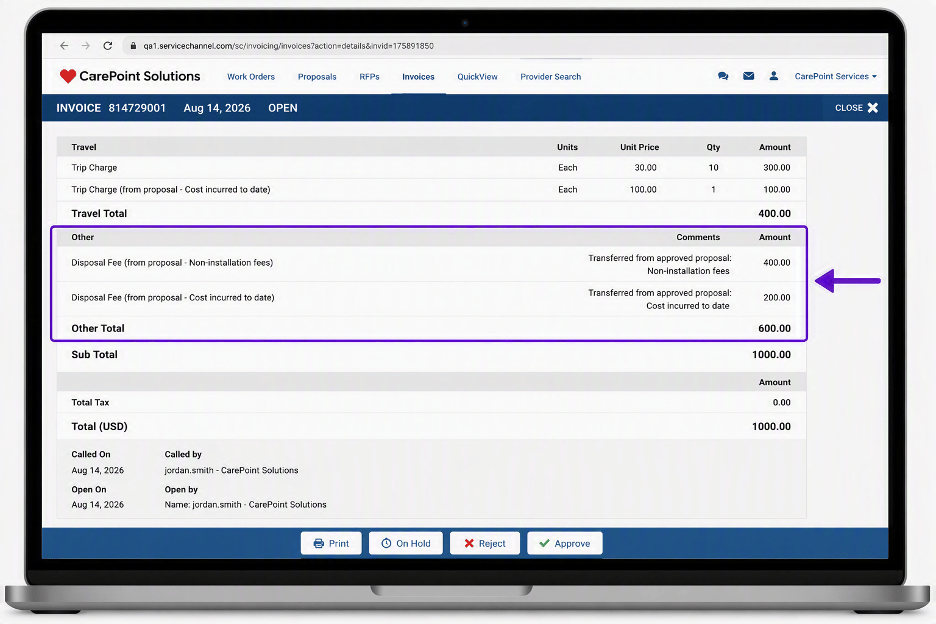
When you create an invoice from an approved proposal, certain proposal costs now transfer automatically to the invoice. This eliminates manual data entry, helps prevent billing errors, and makes it faster to create accurate invoices.
- Reduce manual entry. Cost incurred to date, non-installation labor, and non-installation fees now transfer automatically from approved proposals to invoices.
- Create invoices faster. No need to manually copy these approved proposal costs into the invoice.
- Improve billing accuracy. Proposal amounts and comments carry over automatically to help keep invoice details aligned with approved work.
Get started
Use this feature today when creating invoices from approved proposals. Review the transferred line items, select the appropriate description, and make any edits needed before submitting the invoice.
Looking for details on previous releases? Click here